SAP + AI‑First Sidecar Integrations

Updated: Mar 28
Solution Patterns with Microsoft Copilot Studio & Power Platform

TL;DR
Sidecar solutions are apps, workflows, integrations, and agents built on Power Platform + Copilot Studio that sit next to SAP to modernize user experience and automation without changing SAP core.
The safest adoption path (ladder) is: Read → Read + Explain → Guided Write → CRUD → Enterprise Scale (API governance, identity, events, sidecar data).
ECC usually needs RFC/BAPI + on-prem connectivity more often; GROW expects API-first, fit-to-standard; RISE tends to need enterprise controls such as API management and per-user authorization preservation.
ALM and governance become the real bottleneck after the first 3–5 sidecars; a Power Platform CoE + Pipelines + CoE toolkit/ALM Accelerator is how you scale safely.
What are Sidecar Solutions?
A Sidecar Solution is anything you build around SAP (not inside SAP) to deliver business outcomes faster:
Apps
Mobile and web apps (Power Apps) that surface SAP data and guide users through tasks with fewer clicks.
Workflows
Orchestrated processes (Power Automate) that span SAP plus email, Teams, approvals, SharePoint, Dynamics, vendor portals, etc.
Integrations
Connector-based (SAP ERP / SAP OData) or API-based integrations that make SAP data/actions available to sidecar apps and copilots.
Agents
Copilot Studio agents that let users ask in natural language and then take actions in SAP via approved tools/flows.
Core principle: SAP remains the system of record. Sidecars become the system of engagement—where people interact, approve, automate, and collaborate.
Why Sidecars make sense (license leverage + reality of adoption)
Sidecars are not a “nice-to-have.” They are a practical response to how enterprises already operate:
SAP is deeply embedded
SAP is present in a huge number of global enterprises and runs many mission-critical processes.
Microsoft 365 is already the user’s “front door”
Most employees live inside Teams, Outlook, SharePoint, and Microsoft 365 daily. Sidecars meet users where they already work.
Sidecars help customers “use what they already bought”
Sidecars usually do not require ripping and replacing the SAP core.
Instead, they:
Increase ROI on Microsoft licensing by turning Microsoft 365 + Power Platform into the “experience layer” over SAP.
Reduce the pressure to add more custom code into SAP (which is often costly, brittle, and upgrade-resistant).
Provide a migration-friendly approach, you can keep user experience stable even as SAP backend changes (ECC → S/4, public/private cloud, etc.).
Sidecars are especially relevant with ECC transition timelines
Whether an organization is:
Staying on ECC longer (risk-managed),
Moving to S/4HANA,
Choosing GROW or RISE,
Sidecars let them stop adding new customization to the core and shift innovation to a cleaner, governed layer.
One “big picture” of SAP + AI‑First Sidecar Integrations

This diagram shows how SAP can connect to Power Platform and Copilot Studio through multiple approaches—connectors, gateways, API management, events, and sidecar data.
How to read this:
Users interact through Teams, web/mobile apps, and portals.
Copilot Studio and Power Apps call Power Automate for orchestration.
Power Automate reaches SAP via:
SAP ERP connector + on-prem gateway (RFC/BAPI)
SAP OData connector (OData services)
API management (governed REST/OData)
Events (asynchronous integration)
Optional Dataverse acts as a sidecar operational layer.
CoE + ALM governs everything.
ECC vs GROW vs RISE: the nuances that change your pattern choices
SAP ECC (classic ERP, often on‑prem)
What is common
Integration often relies on RFC/BAPI.
OData may exist but can be inconsistent depending on how the landscape was set up.
Sidecar implications
The SAP ERP connector is often the fastest route for CRUD-like actions, but it requires gateway and SAP connector prerequisites.
For read-heavy scenarios, OData can still be valuable when stable services exist.
Risk/mitigation
Watch for locks, long-running transactions, and performance impacts in high-volume processes.
GROW with SAP (S/4HANA Cloud Public Edition, fit-to-standard)
What is common
Strong push toward standard processes and published APIs.
Limits deep core customization by design.
Sidecar implications
Prefer OData/REST APIs.
Build differentiators in sidecars (apps + agents + workflows) instead of core changes.
API governance becomes important earlier because many small extensions appear quickly in public cloud programs.
RISE with SAP (S/4HANA Cloud Private Edition “as-a-service”)
What is common
More enterprise flexibility than public cloud.
Typically higher governance needs: identity, network controls, monitoring, audit.
Sidecar implications
API management and identity patterns are often part of day-1 architecture.
Principal propagation (preserving SAP authorizations per user) is more common in regulated environments.
Pattern catalog — from “Simple Read” to full CRUD
Pattern 1 — Simple Read Copilot (lookup only)

Sample Use cases
“Show open POs for Vendor X”
“What’s stock for Material Y in Plant Z?”
“Find sales order 45… status”
Why it’s the right start
Lowest risk.
Fast adoption.
Builds trust early.
Typical build
Copilot Studio → Power Automate → SAP (OData or RFC read) → response.
Pattern 2 — Read + Explain Copilot (grounded summaries)

Sample Use cases
“Why is this PO blocked?”
“Summarize order delays and likely root causes from status fields”
“Give me a short update to send to my manager”
Key design rule
The AI should summarize only what SAP returns (status codes, dates, reasons, notes).
Treat SAP output as evidence; the agent writes “explainers,” not guesses.
Pattern 3 — Guided Action (human-in-the-loop write)

Sample Use cases
PR/PO approvals
Release steps, confirmations
Controlled updates with auditability
Why it’s the right first “write” pattern
You can add approvals, adaptive cards, and checks before SAP is updated.
Pattern 4 — Full CRUD via connectors (direct SAP operations)

Use cases
Create sales orders / purchase requisitions
Post goods receipt
Update master or transactional objects where allowed
Why it’s not always “day 1”
CRUD requires stable APIs, strong error handling, and clear ownership.
You must design idempotency, retries, and rollback/compensation patterns.
Pattern 5 — CRUD through API Gateway (enterprise scale)

Sample Use cases
Many sidecars across departments
High transaction volume
Need throttling, monitoring, versioning, and security policies
Why it matters
This pattern prevents integration sprawl.
It protects SAP from uncontrolled calls.
It standardizes interfaces for multiple sidecars and teams.
Pattern 6 — Per-user authorization preservation (principal propagation)
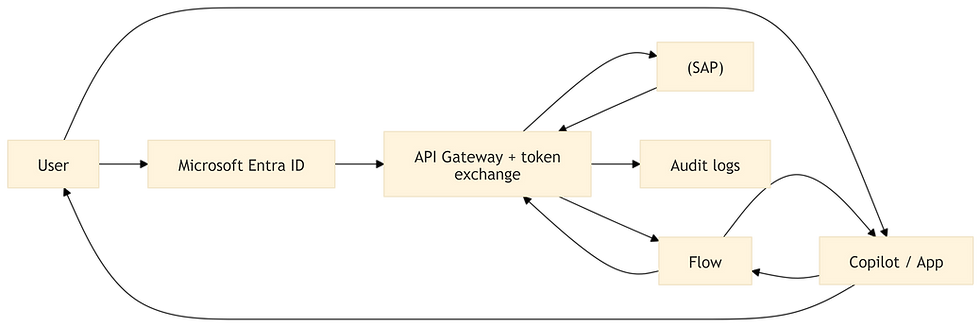
Sample Use cases
Finance/procurement actions where user identity and SAP roles must apply
Strong audit requirements (who did what, in SAP, under what authorization)
Why it matters
Reduces the need for shared “technical users.”
Keeps SAP authorization checks consistent.
Pattern 7 — Event-driven sidecars (asynchronous, resilient)

Sample Use cases
“SO created → trigger downstream workflows”
“GR posted → notify teams + update operational systems”
High-volume processes that should not be synchronous calls
Why it’s powerful
Decouples SAP and consumers.
Improves resilience and scalability.
Pattern 8 — Dataverse as sidecar operational layer (cache + process hub)

Sample Use cases
Case management around SAP objects (disputes, service tickets)
Multi-step processes requiring persistent state and audit trail
Mobile UX and performance needs
Why it matters
Improves UX responsiveness.
Reduces SAP load.
Enables richer orchestration, reporting, and governance.
Use-case mapping: which pattern to choose (a practical ladder)
Ladder Step 1: Read-only (build trust)
Inventory, order status, PO status, vendor/customer lookups
Use: Pattern 1 → Pattern 2
Ladder Step 2: Guided writes (introduce control)
Approvals, releases, confirmations
Use: Pattern 3 (and optionally Pattern 6 when needed)
Ladder Step 3: Full CRUD (scale transactions)
Create/update SAP objects with stable APIs
Use: Pattern 4 → Pattern 5
Ladder Step 4: Enterprise resilience and volume
Event-driven updates, large-scale orchestration
Use: Pattern 7 (+ Pattern 8 where process state matters)
ALM and Governance: how to run sidecar solutions safely with Power Platform CoE?
This section is here because most enterprises can build a pilot—but struggle to run 50+ sidecars safely.
What “ALM for SAP sidecars” must cover
Versioning across environments (Dev/Test/Prod)
Deployment approvals (no direct production edits)
Environment variables and connection references for SAP endpoints and credentials
Auditability for changes to agents, flows, connectors, and permissions
Security guardrails (DLP, connector policy, maker permissions)
Operational monitoring (failures, throttling, retries)
The minimum environment strategy that scales
Dev: unmanaged solutions (fast iteration)
Test/UAT: managed solutions (validation)
Prod: managed solutions only + locked down + approved deployments
The “standard” ALM toolchain in Power Platform CoE
Power Platform Pipelines: in-product ALM for deploying solutions through environments.
CoE Starter Kit: adoption insights, governance processes, inventory, compliance workflows.
Governance components: compliance, cleanup, orphan handling, and risk controls.
ALM Accelerator: strengthens maker/pro-dev ALM discipline at scale.
Practical governance policies for SAP-connected sidecars
Connector strategy
Allow only approved SAP connectors/APIs for production.
Restrict ad-hoc HTTP endpoints unless they are behind an API gateway.
Identity strategy
Decide early: service account vs per-user identity propagation.
Align with SAP security and audit requirements.
Operational discipline
Define retry policies and fallback routes.
Establish dead-letter handling for event-driven processes.
Monitor SAP response time and throttling signals.
Why AccleroTech?
AccleroTech is well-aligned to deliver SAP + AI‑First Sidecar Integrations, because sidecars require full-stack Power Platform engineering, not isolated “app making.” Our capabilities are
Copilots & Conversational AI (Copilot Studio agents and agentic workflows)
AI Builder & Automations (document and process automation around SAP)
Web & Mobile Apps (Power Apps + Power Pages user experiences)
Dataverse for Storage & Integrations (sidecar operational layer patterns)
Business Intelligence & Analytics (Power BI for outcomes and observability)
Power Platform Governance CoE (ALM, governance, and adoption at scale)
Reuse-first approach (prebuilt building blocks and solution patterns to accelerate delivery)
What that means in practice
We can start with a read-only Copilot in weeks, then safely move to guided writes, then enterprise CRUD.
We can apply a disciplined CoE/ALM approach so customers can scale beyond pilots.
We can reuse prebuilt solution patterns to shorten time-to-value.
In short, AccleroTech helps enterprises accelerate productivity with AI-first technologies by building well-architected sidecar solutions on Microsoft Power Platform and Copilot Studio—integrated with SAP, built for enterprise governance, and designed for measurable outcomes.
Contact us at info@acclerotech.com

Comments