Unleashing the Genie: Conversational, Governed Analytics in Teams with Databricks


The Legend of the Unleashed Genie: A Story of Data, Decisions, and a Bottle That Couldn’t Stay Closed
Long before enterprises spoke of data intelligence and conversational analytics, there was a bottle. A heavy, humming bottle locked deep inside the company—filled with backlogged requests, static dashboards, forgotten spreadsheets, and delayed answers. People walked past it every day: operations managers, analysts, executives.
They knew it contained power, but opening it felt too complex, too risky. Inside that bottle, a Genie waited.
This Genie could speak both the language of business and the language of data—turning plain questions into precise logic and transparent answers. But the Genie was trapped. Not by chains, but by the complexity of the enterprise. Scattered data. Siloed governance. Tools that didn’t talk to each other. Questions with nowhere to go.
Then the organization discovered a platform that could turn chaos into clarity. Databricks. Analysts began crafting spaces—curated realms of data, definitions, and examples. The bottle trembled. And on the day the enterprise connected Genie to where people already worked-Microsoft Teams, via a Copilot agent—the cork loosened, the seal cracked, the glass shattered. The Genie stepped out into the everyday flow of work, proclaiming: “Ask me anything.”
All at once, the questions that once required weeks of BI backlog turned into real-time conversations:
“Why did our leak response times rise last week?”
“Which stations have the highest downtime—and what’s driving it?”
“Project next month’s demand and flag any supply risks.”
The Genie answered everyone—responding with charts, tables, and even the SQL logic behind them. Decisions sped up, the data helpdesk queue vanished, and governance held firm. One Genie soon became many: Ops, Finance, Customer Support, Supply Chain—an orchestra of specialized Genies, each carefully curated and all accessible right from within Teams. The bottle, now an empty relic, sat on a shelf as a reminder of how things used to be.
From Myth to Method: What Is Databricks Genie? (And How It Works)
In the story above, “Genie” might sound mythical, but it’s very real. Databricks Genie is the conversational analytics experience within Databricks’ AI/BI platform. In practice, a Genie space packages your data + business semantics + examples into a reusable Q&A model. Business users can then ask questions in natural language and get answers in seconds-returned as narrative explanations, tables, and visuals-complete with the underlying SQL for full transparency.
Crucially, Genie works on your existing data in the Databricks Lakehouse. Each Genie space is tied to tables and views registered in Unity Catalog (the governance layer of Databricks). When a user asks a question, Genie translates it into a SQL query against those approved datasets and runs it on a Databricks SQL warehouse (ideally a Serverless SQL warehouse for auto-scaling and reliability).
Security & governance are built in
Thanks to Databricks’ integration with Azure Active Directory, each question asked through Genie carries the user’s identity via enterprise OAuth. That means every answer is constrained by the same fine-grained data permissions you’ve defined in Unity Catalog. A department manager sees only the data they’re allowed to see, even if the conversation happens directly in Teams. This approach preserves compliance and trust—Genie will never “let slip” data it shouldn’t, even as it’s freed from the bottle.
The Genie Experience
To the end user, interacting with Genie feels like chatting with a super-smart colleague. Ask a question in plain English (for example, in a Teams chat), and Genie responds with an analysis: often a brief explanation followed by a table or chart of results, and a snippet of SQL or reasoning behind the answer.
If the question is ambiguous or lacks detail, Genie might ask a clarifying question (“Which region or time period are you interested in?”) rather than guessing.
Users can refine or follow up with further questions in conversation. Throughout, the heavy lifting (interpreting the question, generating and executing the SQL, applying analytical models, formatting results) is handled by Databricks behind the scenes.
The business user simply gets the insight they need, when they need it, in natural language.
Infographic 1 – The Bottle → The Portal → The Unleashed Genie (Conceptual)

\ Figure: Conceptual flow of data & insight. The “Bottle” represents the legacy model of backlogged requests and delayed insights; the “Portal” is the curated Databricks Genie space (filled with governed data, context, and examples); and the “Unleashed Genie” represents Genie integrated into everyday work via Microsoft Teams (through the Copilot platform).
What Changes When You Unleash the Genie? (Practitioner’s View)
In practical terms, moving from the “bottled-up” model to an “unleashed Genie” model brings several key shifts for a data team and the organization at large:
Insights in the Flow of Work: Instead of forcing users to log into a separate BI tool or wait for weekly reports, you bring data Q&A into Microsoft Teams (and other daily tools). Business questions get answered in the same channel where collaboration happens, increasing data-driven decisions in real time.
Governance Front and Center: Every Genie query is executed with least-privilege access. By leveraging Unity Catalog permissions, space-level ACLs, and OAuth, each answer is tailored to the asker’s data permissions. You can even assign “Consumer” roles for read-only access to a space, ensuring that while Genie is easily accessible, it’s never a security loophole.
Reliable, On-Demand Performance: Using Serverless SQL Warehouses for Genie ensures that the underlying compute infrastructure just works when a question arrives. There’s no risk of users finding the BI engine turned off or under-provisioned. The serverless engine scales out as needed and avoids cold start delays that could frustrate real-time Q&A.
Precision through Focus: Each Genie space is a specialist, not a generalist. For best results, keep each space tightly scoped to a single domain or topic (think 5–10 high-quality tables/views max). This “small, well-curated space” approach yields more precise answers. For cross-domain analysis (e.g. a question that spans Sales and Supply Chain data), you can orchestrate multiple Genie spaces behind the scenes, rather than dumping every dataset into one large space. The result is more accurate answers and easier maintenance.
Genie in Action: Use Cases and Impact for Databricks Customers
Genie has the potential to redefine how different teams access insights. Some impactful use cases include:
Operations: Front-line operations managers can ask, “What’s causing delays in our northeast distribution center this week?” instead of sifting through BI dashboards. Genie might surface a chart showing a spike in downtime at a specific station, with an explanation drawn from maintenance logs – all in response to a simple question.
Customer Support: A support lead could query, “Which product line saw the highest increase in support tickets, and why?” and get an immediate breakdown by product, complete with trends and likely root causes (pulled from an integrated issue-tracking dataset).
Sales & Finance Forecasting: A sales manager asks, “What are our forecasted vs. actual sales for the last quarter, and which regions exceeded their targets?” Genie can instantly return the figures, highlights of top-performing regions, and even suggest factors behind under-performance in other areas.
Supply Chain Management: Procurement teams might ask, “Do we anticipate any stockouts next month based on current inventory and lead times?” The Genie, having been fed inventory and supply chain data in its space, can cross-analyze current stock levels against lead-time data, flagging any high-risk items.
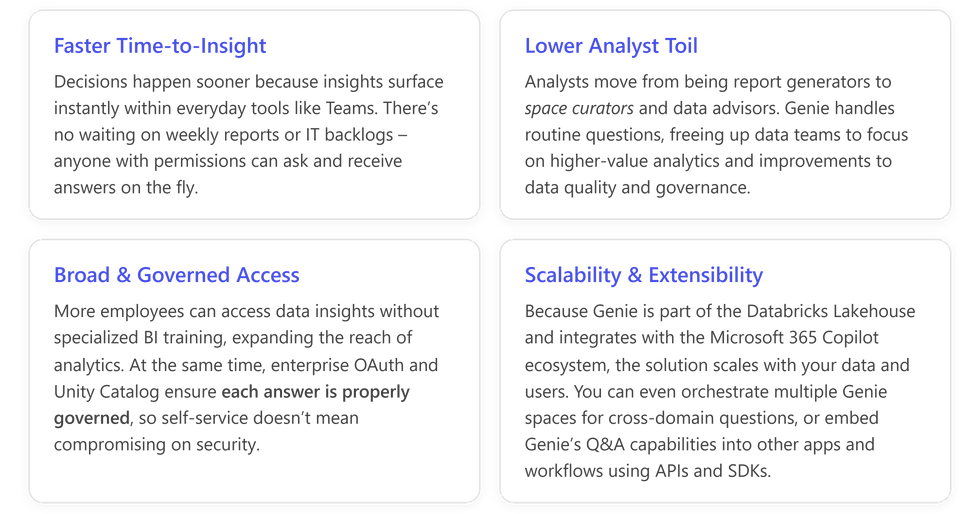
The common theme: faster, smarter decisions.
By unleashing Genie, organizations collapse the time from question to answer from days or hours to just minutes or seconds.
Business users feel empowered to explore data on their own, in plain English, without always depending on a data analyst as an intermediary.
Data teams, in turn, save time previously spent on repetitive ad-hoc queries and reports; they can redirect their expertise to more complex analytics and to curating the knowledge base (Genie spaces) that make self-service possible.
This paradigm shift can lead to:
Best Practices for Building Effective Genie Spaces
To maximize Genie's accuracy and usefulness, it’s critical to invest in how you curate your Genie spaces. Think of a Genie space as a new team member: it needs to be onboarded with the right context and knowledge to do its job well. Here are some best practices for creating high-quality Genie spaces:
Prepare high-quality, well-documented data: Genie is only as good as the data you give it. Use your Lakehouse’s “gold tables” – clean, business-ready datasets – and register them in Unity Catalog with clear table and column descriptions. If you have complex data models, consider creating metric views or consolidated views to simplify common metrics and dimensions. Well-described, simplified datasets help Genie interpret questions accurately and present consistent answers.
Define semantics with SQL, not just text: In Genie, you can define business logic in the knowledge store using SQL expressions and example queries. Take advantage of this! For key business terms or calculations (revenue, churn rate, SLA compliance, etc.), provide SQL expressions in the space’s knowledge store so Genie knows exactly how to compute them. For common complex questions, add example SQL queries as teaching aids. These examples act as patterns that Genie can follow when users ask similar questions. Using structured examples and expressions is more reliable than trying to rely on lengthy free-text instructions.
Keep instructions clear and minimal: Genie spaces allow you to add some text instructions (policy or guidance for the AI). Use them sparingly and keep them very specific. For instance, if there are ambiguous terms or preferred naming conventions, document those. Avoid writing long, generic essays in the instructions – if you find you’re trying to explain a lot in natural language, it likely means your data or examples need improvement instead. A few well-placed instructions (like how to handle certain ambiguous requests, or how to format results) can help tweak Genie’s behavior, but too many can confuse it.
Narrow the focus and iterate: Don’t try to boil the ocean in one Genie space. Start with 5–10 tables around a single domain or use-case. The more focused the scope, the better Genie can understand the context. Gradually expand the space based on real user feedback. Iteration is key: monitor Genie’s answers, gather feedback from users about relevance and accuracy, and refine the space by adding or adjusting definitions, examples, or data as needed. This incremental approach will yield continuous improvements in Genie’s performance.
Secure the foundations: Ensure that permissions are correctly set before rolling Genie out. Analysts who create Genie spaces need the Databricks SQL access entitlement and proper access permissions on all data in the space (SELECT on tables/views, CAN USE on the SQL warehouse, and appropriate CAN VIEW/EDIT/MANAGE rights on the space). Likewise, end users who will query Genie should at minimum have CAN VIEW access to the space and read access to the underlying data via Unity Catalog. If using a service principal or app registration to facilitate connectivity, that principal needs these permissions as well. By setting up robust access control from the start, you maintain compliance even as Genie answers many users’ questions.
From Teams to Genie: Connecting Spaces to Copilot Agents
Perhaps the most exciting part of “unleashing” Genie is how easily you can bring these conversational insights into Teams and other M365 Copilot experiences. Databricks provides a native integration via the Microsoft Copilot platform, meaning your Genie space can be hooked into a Copilot Agent (a kind of chatbot) with just a few clicks.
From there, publishing that agent into Microsoft Teams is straightforward – enabling your users to chat with their data in a familiar interface.
Behind the scenes, Microsoft’s Copilot Studio acts as the bridge between Teams and your Genie space. In Copilot Studio, you create or configure an Agent (for example, a “Genie Bot” for your organization).
Using the built-in Azure Databricks Genie tool plugin, you bind the agent to your target Genie space. This involves selecting your Databricks workspace and the specific Genie space, and establishing a secure connection via OAuth. (Make sure to enable any required preview features in Databricks, such as partner-managed AI access and the Managed Copilot service, as per Databricks’ documentation.)
Once your Genie is connected, you publish the agent to Teams – which essentially makes it a bot that users can interact with in chat.
Now, when a user mentions your Genie bot in Teams and asks a question, here’s what happens in a matter of seconds:
Infographic 2 – From Question to Governed Answer (Teams → Genie → Data) \

\ Figure: Technical sequence from a user’s question in Teams to a governed answer via Genie. Each step is secured via the user’s identity (OAuth token) to enforce data permissions.
User (Teams) – A business user asks a question in a Teams chat (to the Genie bot or Copilot agent).
Copilot Agent (Teams) – The Copilot agent receives the question and recognizes it needs Databricks Genie to answer. It forwards the query to Genie’s tool interface, including the user’s OAuth credentials.
Genie Tool (M365 Copilot) – This component (managed by Microsoft’s Copilot infrastructure) brokers the call to Databricks. It passes the question and user identity to the Databricks Genie backend.
Genie Space (Databricks) – Genie's backend service (Conversation API) interprets the question and maps it to the configured Genie space. Using the space’s knowledge (cataloged data, semantics, sample queries), it forms a relevant SQL query.
Unity Catalog & Warehouse – Genie’s query is executed against your governed Lakehouse data. Unity Catalog ensures the user is allowed to see the requested data, and the SQL Warehouse (serverless) executes the query at scale.
Return to Genie – The query results (e.g. a result table or figure) are sent back to the Genie service, which packages the answer. Genie generates a natural-language narrative explaining the findings, attaches the result table or visualization, and includes the SQL code for transparency.
Copilot Agent Replies – The agent receives Genie’s answer and posts the response into Teams. The user sees a conversational answer (often with a brief explanation and a chart or table), and they can drill into the details if needed (for example, viewing the SQL or asking a follow-up question).
The beauty of this architecture is that all the heavy lifting and governance checks happen behind the scenes, invisibly to the user.
From the user’s perspective, they asked a question in Teams and got an answer instantly, without needing to know that Genie, Unity Catalog, and a SQL engine all collaborated to deliver it.
For the data team, it means no shortcuts: every query is audited, authenticated, and executed on authorized data. Azure AD (Entra ID) handles the user authentication via OAuth, Unity Catalog enforces permissions on data access, and the result follows the rules you’ve set.
Key integration components illustrated above:
Microsoft Teams + Copilot – Provides the user-facing Q&A interface. This is where users ask questions and get answers, making analytics a seamless part of daily work conversations.
Azure Databricks Genie (as a Copilot tool) – The conversational AI layer that interprets questions and fetches answers from your Lakehouse. Genie’s integration as a Copilot tool means you don’t need to custom-build a bot from scratch; Microsoft’s framework calls Genie for you.
Enterprise OAuth & Unity Catalog – Ensures every question and answer is identity-aware and compliant. OAuth passes the user’s ID through each step, and Unity Catalog restricts data to what that user is allowed to see. You get interactive, natural-language analytics without sacrificing security.
Serverless SQL Warehouse – The scalable compute engine that runs the queries. Using a serverless warehouse removes the burden of capacity management; it spins up in response to the question and auto-scales to deliver the answer quickly, then scales down. This helps maintain responsiveness for Genie, especially as usage grows across many users and questions.
The Case of AI‑Driven Demand Insights in City Gas Distribution
(Unleashing the Genie: Conversational, Governed Analytics in Teams with Databricks)
City Gas Distribution (CGD) networks operate complex infrastructure to deliver gas safely and efficiently. Consumption patterns vary hourly and seasonally, making planning and resource allocation challenging.
With Databricks and Power Platform, CGD companies can build an AI‑driven demand insights Copilot that continuously analyzes data streams:
Automated analytics: Sensor and meter data are streamed into Databricks’ Lakehouse. A Databricks job runs time‑series models to detect daily and seasonal consumption trends, highlighting peak periods, volatility and unusual behavior across network zones.
Shaped by Genie Spaces: A Genie Space captures domain knowledge—such as weather influence, public holidays or industrial schedules—and uses it to refine queries. When users ask about “unusual consumption in the southern region last week,” the space automatically applies relevant filters and transformation logic before returning results.
Interpretive summaries with Copilot: A Copilot Studio agent surfaces the insights via natural‑language summaries. It might say, “Consumption peaked 15% above forecast on Tuesday due to an unexpected cold front. There was heightened volatility in cluster 7, likely driven by industrial usage.”
Proactive field adjustments: Based on the insights, Power Automate triggers field operations tasks—like scheduling maintenance crews, balancing network pressures or notifying customers. The CGD planners can pre‑emptively adjust resources, reducing service disruptions and optimizing asset utilization.
This use case illustrates how data, AI and agentic workflows can converge to multiply operational intelligence.
In this demo video, we show how a Copilot Studio agent inside Microsoft Teams can fetch governed insights from Databricks through secure MCP and Entra‑based connections, letting CGD planners ask simple natural‑language questions without writing SQL. A Genie Space interprets the CGD business context and auto‑generates optimized queries on Databricks SQL Warehouse, returning clean, structured results instantly.
Fast-Track Guide: From Zero to Genie in 4 Weeks
(Unleashing the Genie: Conversational, Governed Analytics in Teams with Databricks)
For organizations eager to unleash Genie, a phased approach can help you go from concept to production quickly while covering all the bases:

Throughout these steps, keep in mind change management. A tool like Genie can transform workflows, but users benefit from guidance on how to use it effectively.
After the initial launch, some companies establish an internal Champions group or a feedback channel to continuously improve the Genie experience.
Empower your business users with knowledge on phrasing questions and encourage your data team to continuously curate and update the Genie spaces as the business evolves.
Conclusion: The Genie Is Out – What Will You Ask?
Unleashing the Genie means your enterprise data is no longer locked up – it’s conversational, accessible, and actionable to those who need it, when they need it. By combining Databricks’ powerful Lakehouse and governance capabilities with the natural-language interfaces of Microsoft Teams and Copilot, organizations can deliver instant, trusted insights in natural language right in the flow of work.
The result? Faster decisions, empowered employees, and a data-driven culture where insight flows as freely as conversation.
The bottle is broken – the Genie is out. Now it’s time to put your Genie to work and see what wishes it can grant for your business.
Why AccleroTech?
AccleroTech specializes in building AI‑first solutions that combine the Power Platform with Databricks.
Their expertise lies in designing low‑code applications and agents that integrate seamlessly with Lakehouse architectures.
For global companies, AccleroTech has delivered digital assistants that monitor distribution networks and provide operational insights.
By blending domain knowledge with AI models running on Databricks and surfacing them via Copilot Studio, they enable planners and field teams to make informed decisions.
Organizations can partner with AccleroTech to implement tailored agentic solutions—ranging from demand forecasting and asset management to broader operational analytics-and accelerate their journey toward intelligent decision support.
AccleroTech’s edge comes from understanding both the intricacies of the Microsoft ecosystem and the nuances of data engineering in Databricks with Databricks and Power Platform Integration Patterns.
Email us at info@acclerotech.com to discuss how Databricks and Copilot can play together!


Comments